AI Design · · 10 min read
Agentic UX: Design Patterns for AI Agents That Act on Their Own
A practical guide to agentic UX — the design patterns for AI agents that plan, use tools and take action, and how to keep a human able to see, steer and stop them.
Ravish Saini · Lead Product Designer
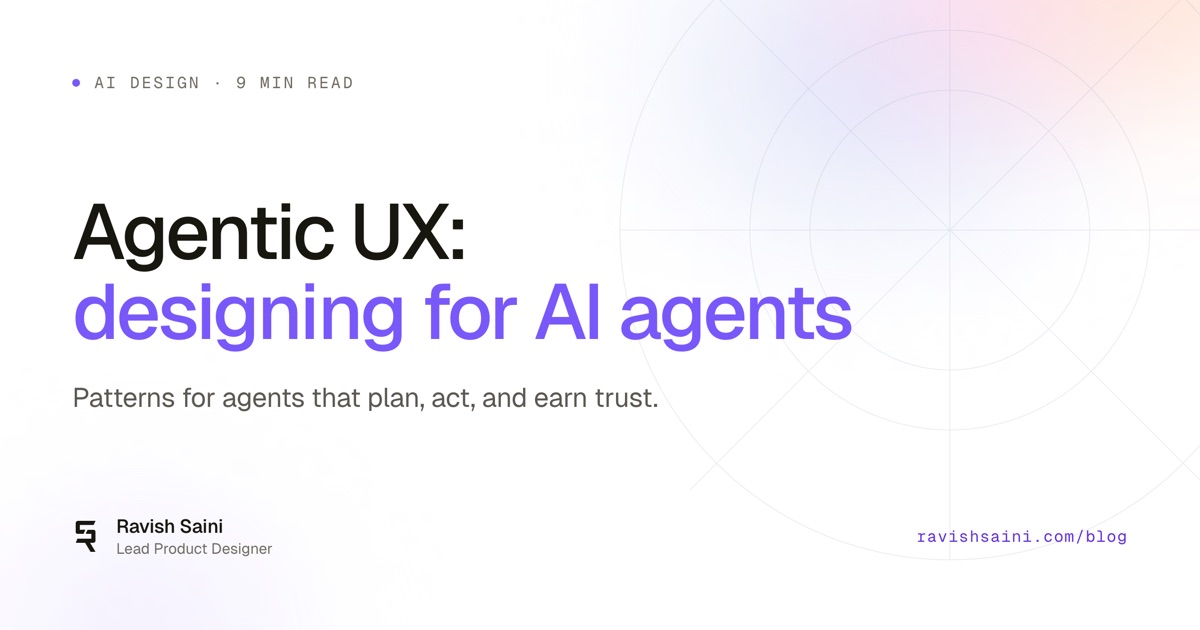
A chatbot answers. An agent acts. That one difference is the whole of why agentic UX is a different design problem, and why most of the patterns you learned for conversational interfaces stop being enough the moment the system can do something on the user's behalf.
For the last few years the hard UX question in AI was how do I present a response the user can trust? Now there is a harder one underneath it: how do I let the system take an action the user can trust? A wrong answer wastes a minute. A wrong action sends the email, moves the money, closes the ticket, or deletes the row. The design-in-tech conversation has started calling this shift "from UX to AX" — designing the experience of working alongside an agent rather than operating a tool. Whatever you call it, the job changes: you are no longer laying out a response, you are governing an actor.
This is a practical guide to the patterns that make that work. They come from building an agentic platform end to end — the agent builder, the orchestration, the copilot — so they are written as design decisions with trade-offs, not as a trend list.
What agentic UX actually is
Agentic UX is the design of products where an AI agent pursues a goal across multiple steps — perceiving context, making a plan, choosing tools, and taking actions — while a human stays able to see what it is doing, steer it, and stop it. The defining trait is not intelligence or chat; it is autonomy over actions. A conversational interface decides what to say. An agent decides what to do, often several times in a row, before it hands anything back.
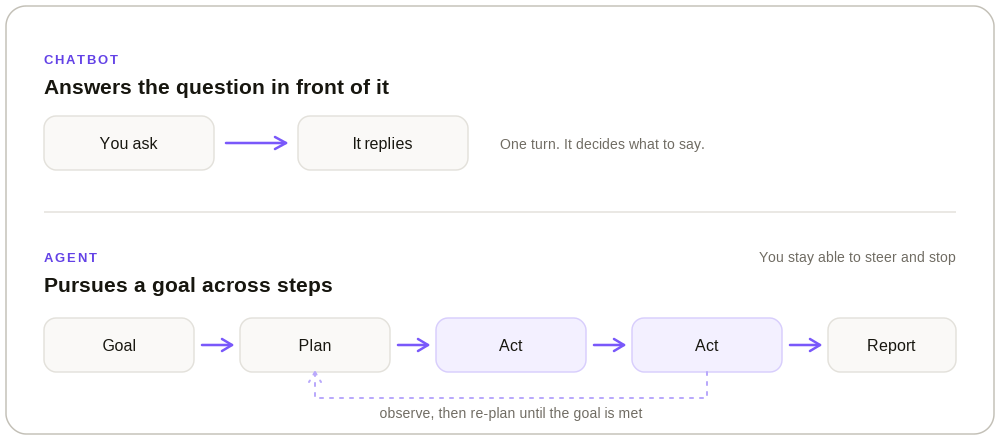
That shifts the designer's responsibility. In a chat interface you design turns. In an agentic interface you design a loop the user is not inside for every step — so the interface has to compress a lot of machine activity into something a person can supervise without reading all of it. Every pattern below is a different answer to the same tension: give the agent enough room to be useful, without taking the human out of the decisions that matter.
If you haven't designed the conversational layer underneath this yet, that's its own discipline — I wrote about it in UX design for conversational AI. Agentic UX sits one level up: the agent still has to understand intent, but now it also has to act on it.
Show the plan before the work
The single highest-leverage pattern is the plan preview: before an agent starts executing a multi-step task, it shows the steps it intends to take, and lets the user approve, edit, or reorder them.
This does three things at once. It makes the agent's interpretation of the goal visible before any action is taken, which is the cheapest possible moment to catch a misunderstanding. It gives the user a mental model of what "running" will involve, so a progress indicator later means something. And it turns an opaque black box into a reviewable artifact — the user is approving a plan, not gambling on a prompt.
The trap is making the plan a wall of text. A plan the user won't read is theatre, not control. Keep steps short, verb-first, and scannable; show the tools or systems each step will touch; and let the user strike or edit a step inline rather than rejecting the whole thing and starting over. The goal is a thirty-second read that earns the next five minutes of autonomy.
Put approval gates on the irreversible, not on everything
Human-in-the-loop is the instinctive safety answer, and over-applied it is also the fastest way to make an agent useless. If the user has to approve every step, you have built a very slow way to do the work manually.
The design judgment is where the gates go. Gate the actions that are expensive, irreversible, or externally visible — sending a message, spending money, writing to a system of record, deleting data. Let the reversible, internal, read-only steps run freely. A good heuristic: if undo is cheap, don't gate it; if undo is impossible, always gate it. Everything in between is a product decision about risk tolerance, and it should be explicit, not accidental.
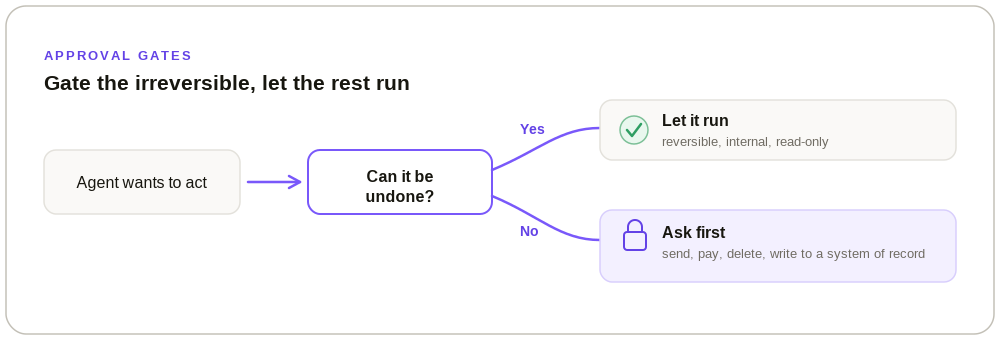
When you do gate an action, the approval has to carry enough context to make a real decision — what will happen, to what, and whether it can be undone — not just a "Confirm?" with no object. An approval the user rubber-stamps because it never tells them anything is worse than no approval at all, because it launders risk as consent.
Make autonomy a dial, not a switch
Trust in an agent is earned, not granted on day one — so the interface should let autonomy grow. The pattern is levels: the same agent can run in a supervised mode where it asks before most actions, an assisted mode where it acts but narrates and pauses on anything risky, and an autonomous mode where it runs end to end and reports back.
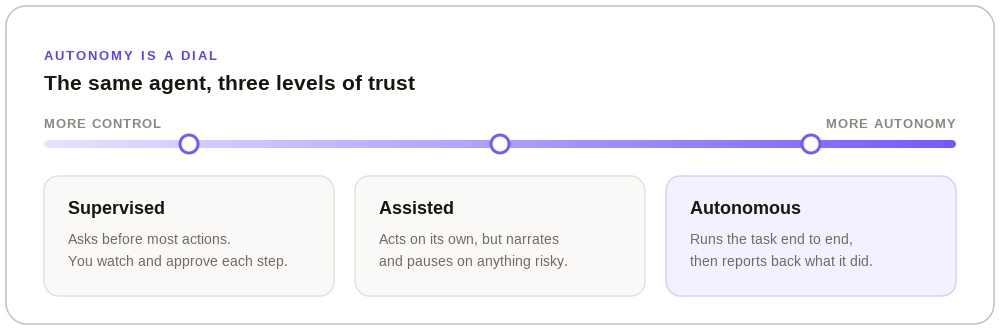
Progressive delegation matters because the right level is different per user, per task, and per week. A new user wants to watch; the same user a month later is annoyed at being asked. A low-stakes task can run wide open; a high-stakes one earns a tighter leash. Designing autonomy as a single on/off switch forces a choice between "too cautious to be useful" and "too loose to be trusted." A dial lets the product meet the user where their confidence actually is, and lets that confidence move.
Make the current level always visible, and make changing it a first-class control, not a buried setting. The user should never be surprised by how much the agent just did on its own.
Show confidence — and specifically where it's unsure
Agents are probabilistic, and pretending otherwise is how trust breaks. But a single confidence percentage is close to useless; "87% confident" tells the user nothing they can act on.
The useful version is located uncertainty: a small, honest signal of which part the agent is unsure about, and a one-tap way to verify or correct that specific part. "I matched this to the Q3 invoice, but I'm not sure about the vendor — is this right?" is worth more than any global score, because it points the user's attention at the one place their judgment is needed. Calibrated confidence is a targeting mechanism, not a disclaimer.
This is also where an agent earns the right to more autonomy. A system that reliably flags its own weak spots is one a user can safely delegate more to — because they trust it to raise its hand before it does something it's unsure about.
Give the agent visible memory and an audit trail
An agent that forgets is frustrating; an agent that remembers invisibly is unsettling. The pattern is memory you can see and edit — what the agent knows about the user, the task, and the earlier steps — paired with an audit trail of what it actually did.
The two serve different users of the same product. Visible, editable memory is for the person working with the agent now: it lets them correct a wrong assumption once instead of fighting it every turn. The audit trail is for later — the review, the hand-off, the "what happened here?" — and in enterprise settings it is often a hard requirement, not a nicety. Both turn the agent from something that happens to the user into something they can inspect and account for.
Make the reasoning inspectable, not inescapable
Transparency is good; forcing every user to read the model's chain of thought is not. The pattern is layered disclosure: a plain summary of what the agent did by default, with the interpretation, tool calls, intermediate steps, and raw outputs one click away for the user who needs them.
Most people, most of the time, want the outcome and a reason to believe it. A smaller set — a power user debugging a bad run, an engineer, a reviewer signing off — needs the whole trace. Designing for only one of them fails the other. Default to the summary; make the depth available; never make the depth the price of using the product. This is the same discipline I leaned on designing Agent Studio, where the whole challenge was showing how an agent thinks without turning the screen into a debugger.
Design the failure path first
The most important pattern is the one teams build last: what happens when the agent is wrong. And it will be wrong — the question a design answers is whether being wrong is recoverable.
Three things make failure survivable. Undo and rollback on anything the agent changed, so a mistake is a setback rather than a disaster. A graceful stop — a visible, always-available way to halt a run mid-flight, which is the control users reach for the instant they feel the agent drift. And a legible failure state: when the agent can't do something, it should say so plainly and hand control back, rather than failing silently or, worse, confidently doing the wrong thing. An agent that fails loudly and reversibly is one people will actually let off the leash. Designing that path first, not last, is the difference between an agent users trust and a demo they don't.
A quick checklist
Before an agentic feature ships, I run it against these:
- Does the agent show its plan before it acts on anything multi-step?
- Are approval gates on the irreversible actions — and only those?
- Is the current autonomy level always visible and easy to change?
- Does the agent flag where it's unsure, not just that it is?
- Can the user see and edit what the agent remembers?
- Is there a one-click path from summary to full reasoning?
- Can the user stop a run instantly, and undo what it already did?
If the answer to any of these is no, the gap is usually where trust will break.
FAQ
What is agentic UX?
Agentic UX is the design of products where an AI agent pursues a goal across multiple steps — understanding context, planning, using tools, and taking actions — while keeping a human able to see, steer, and stop it. Its defining concern is autonomy over actions, not conversation.
How is agentic UX different from conversational AI UX?
Conversational AI UX is about designing what the system says in response to a user. Agentic UX is about designing what the system does on the user's behalf, often across several actions before returning. The stakes are higher because a wrong action can be irreversible, so the patterns centre on supervision, approval, and recovery rather than just clear responses.
What are the most important agentic UX patterns?
The core patterns are showing the plan before acting, putting approval gates on irreversible actions, making autonomy adjustable rather than all-or-nothing, communicating where the agent is uncertain, giving it visible memory and an audit trail, making its reasoning inspectable on demand, and designing a clear failure path with stop and undo.
Do users want AI agents to act autonomously?
Users want outcomes, not oversight work, so they value autonomy — but only once they trust the agent, and only for actions they consider safe. That is why autonomy works best as a level that can grow over time, with tighter control on high-stakes actions and more freedom on reversible ones.
Why does trust matter so much in agentic design?
Because an agent acts in the real world, a single bad action can cost the user money, time, or credibility. Trust is what lets a user delegate at all, and it is built by making the agent's plans, confidence, and actions visible and reversible — not by making it sound certain.
I'm Ravish Saini, a Lead Product Designer working on agentic AI at SimplAI. If you're designing agents that act on people's behalf, let's talk.